

You finish a draft in Claude. It reads fine. Then the ritual starts: select all, copy, open a new tab, find the detector you bookmarked months ago, paste, wait, squint at a score you weren’t expecting, flip back to the chat, ask for a rewrite of paragraph three, copy again, paste again.
Five minutes gone. Worse, you’ve lost the thread of what you were trying to say.
Most people don’t run that loop at all. They skip the check. That’s the real problem, and it’s why checking text inside the chat you already use, through the Model Context Protocol (MCP), is worth a minute of setup.
Why the AI Check Is the First Step People Skip
It isn’t laziness. It’s friction. Every extra tab is one more interruption, and the workday already has plenty. Microsoft’s 2025 Work Trend Index special report on the “infinite workday” found that heavily pinged employees get interrupted about every two minutes during core hours, adding up to 275 pings a day across email, chat and meetings.
Add a detector tab to that and the check is the first thing to go.
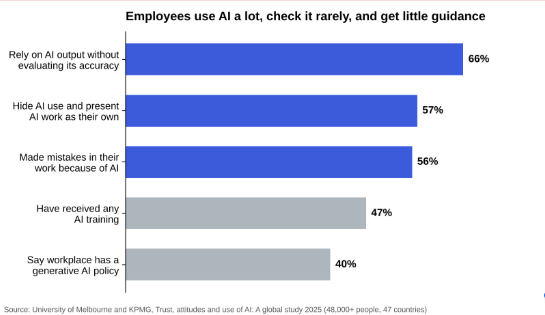
The cost of skipping it shows up in the numbers. The University of Melbourne and KPMG surveyed more than 48,000 people in 47 countries for their 2025 global study on trust in AI. Among employees, 66% said they rely on AI output without evaluating its accuracy, and 56% said they’d made mistakes in their work because of AI. Another 57% admitted they hide their AI use and present AI-generated work as their own.
Look at the two grey bars. Fewer than half of employees had any AI training, and only 40% said their workplace has a policy or guidance on generative AI. So people lean on AI heavily, check it rarely and get little direction. A check that lives where the writing happens won’t fix all of that. It does remove the easiest excuse.
What MCP Changes About Where Checking Happens
MCP is an open standard that lets AI apps like Claude and ChatGPT call outside tools. Instead of you carrying text to a tool, the assistant carries the request and brings the result back into the conversation.
It also isn’t one company’s pet project. In December 2025, Anthropic donated MCP to the Agentic AI Foundation, a fund under the Linux Foundation that Anthropic co-founded with Block and OpenAI, the company behind ChatGPT. Rivals sharing one plug matters for a practical reason. A server built to the standard works across clients, so you aren’t tied to a single app, and switching assistants next year doesn’t mean rebuilding your checking habit.
How Phrasly’s MCP Server Puts a Detector Inside Your Chat
Phrasly’s server is small and focused. Once it’s connected, you can check AI text from any MCP client by asking in plain language, and the assistant picks the right tool. There are three:
- detect_ai_text scores your text with the Phrasly AI detector and reports the verdict, the AI percentage and how many sentences were flagged.
- humanize_text rewrites stiff, AI-sounding passages. On paid plans and trials it runs Phrasly Ultra, and if you ask it to verify, you also get a before and after AI score.
- get_account_status tells you which plan you’re on, how many words you have left and how much you’ve used today.
Apps that support MCP prompts also get three ready-made commands: humanize, humanize and verify, and check for AI. In Claude Code you’ll find them by typing /mcp__phrasly.
What I like most is that nothing is a lite version. It’s the same engine as the website, with the same limits and word balance, and humanized drafts land in your Phrasly document history, so you can reopen them in the editor later.
Connecting It in Claude, ChatGPT and Claude Code
Setup takes about a minute per app, and the server address is the same everywhere: https://phrasly.ai/api/mcp. Free and paid Phrasly accounts can both connect.
Claude on the web and desktop
Open Settings, then Connectors, and click Add custom connector. Paste the URL, click Connect and approve access with your Phrasly account. Custom connectors are available on Claude Pro and Max. On Team and Enterprise, an owner adds the connector once and each member signs in with their own Phrasly account.
ChatGPT with Developer mode
Go to Settings, then Apps & Connectors, and switch on Developer mode under Advanced. Create a custom connector, paste the URL, choose OAuth and leave the Client ID and Secret blank. ChatGPT registers itself and sends you to the Phrasly sign-in. Developer mode is available on Plus, Pro, Team and Enterprise.
Claude Code and other MCP clients
Run claude mcp add –transport http phrasly https://phrasly.ai/api/mcp in your project, then type /mcp, choose phrasly and authenticate in the browser tab that opens. Any other client that supports remote servers and OAuth sign-in connects the same way.
There’s no API key to copy. That’s less common than you’d think. While going through the detector servers that rank for this search, I found several that want a key pasted into a JSON config file, and one that won’t score text under 250 words.
A Write, Check and Edit Loop That Fits in One Window
Here’s the routine I’d suggest. It’s short on purpose.
- Draft in the chat. Write, or ask for a first pass, the way you normally would.
- Ask for a check. “Check this for AI” calls detect_ai_text and returns a score plus the number of flagged sentences.
- Edit by hand first. Rewrite the flagged parts in your own words and add the detail only you know. This is where the draft becomes yours.
- Humanize only what’s still stiff. Run “humanize and verify” on a stubborn paragraph rather than the whole piece, then compare the two scores.
- Check your balance before a batch. Humanizing draws on the same word balance as the website, so ask for your account status before you run ten cold emails through it.
| What you type in the chat | Tool it calls | What comes back |
| “Check this draft for AI” | detect_ai_text | Verdict, AI percentage, flagged sentence count |
| “Humanize this and verify it” | humanize_text | A rewrite plus a before and after AI score |
| “How many words do I have left?” | get_account_status | Plan, words left, today’s usage |
Notice what’s missing from that list. Tabs. You never leave the conversation, so the context you built up with the assistant stays put.
Read the Score as a Hint, Not a Verdict
A detector score is a signal. Treat it like one.
The best-known warning comes from Stanford researchers Weixin Liang and colleagues, who tested seven widely used GPT detectors in a 2023 paper in Patterns. On TOEFL essays written by non-native English speakers, the detectors labeled more than 61% as AI-generated on average, while classifying essays by US eighth graders almost perfectly.
Detectors have improved since then, but the lesson still holds. Use flagged sentences to find writing that sounds generic, then fix it. Don’t use a percentage to accuse a colleague, a student or yourself. And if your school or company has an AI policy, follow it. A clean score doesn’t replace disclosure.
Keep the Connection Narrow
Any MCP server you connect can act for you, so check what it can reach before you click Connect. Phrasly’s server only has the three tools above. It can’t read your files, open web links or run commands. You approve the connection through OAuth, and you can disconnect from your Phrasly settings whenever you like. For a quick checklist you can use on any server, Phrasly’s guide to MCP security risks and safe use takes about five minutes to work through.
One Window, One Draft, One Honest Check
The best check is the one you actually run. When detection lives in another tab, it competes with every ping and usually loses. When it lives in the chat where you’re writing, it’s one sentence away.
So connect once. Draft, ask for a check, fix what’s flagged in your own voice, and only then reach for the humanizer. You’ll catch the generic lines before your reader does, and you won’t lose your train of thought doing it. Try it on your next real draft, even with a free account, and see whether the loop sticks.
