


Keeping Windows drivers up to date can be a tedious job. A PC has drivers for many different parts, including the graphics card, audio hardware, network adapter, chipset, printer, and other connected devices. Finding updates for each one manually can take a lot of time.
Driver updater software offers a simpler way to handle this task. These programs scan the PC, find older or missing drivers, and provide updates from within one interface. Some also include backup, restore, offline updating, and system repair tools.
In this guide, we compared three driver updater tools that work with Windows. The comparison is here to help you make the right choice.
Best Driver Updater to Know in 2026
Here are three driver updater programs worth knowing about if you use Windows 11. Each takes a slightly different approach to finding and managing drivers.
1. Driver Booster 14: Editor’s Choice

Driver Booster 14 is a Windows driver management tool built around automatic scanning and updating. Its latest release brings a database of more than 23 million drivers, multi-version scanning, a redesigned interface, and a new tool for fixing missing game DLLs.
Key Features
23 Million+ Driver Database
Driver Booster 14 has access to a database containing more than 23 million drivers. This broad coverage can be useful when a PC contains hardware from several different manufacturers. The software checks installed drivers and identifies available updates.
Multi-Version Driver Scanning
One of the more useful changes in version 14 is multi-version scanning. Instead of simply pointing to the newest available driver, Driver Booster can identify different driver versions. It can also distinguish between the latest version and a more stable version, giving users another option when installing an update.
Fix Missing Game DLLs
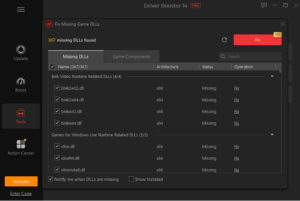
Driver Booster 14 adds a dedicated feature for missing game DLL problems. It supports more than 680 DLLs across over 60 game-related components. It can check for missing files connected with technologies such as DirectX, Visual C++ Redistributable, XAudio, OpenAL, and PhysX.
Backup and Restore
Driver updates can occasionally create problems, so having a way back is useful. Driver Booster provides driver backup and restore functions and can create a restore point before updates. Users can also roll back a driver if a newer version does not work properly.
Offline Driver Updater
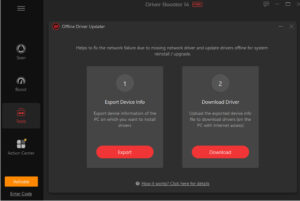
The Offline Driver Updater is useful for computers that cannot get online because of a missing network driver. It provides a way to gather hardware information from the affected PC and use another computer to obtain the required driver.
Pros
- It provides access to a database of more than 23 million drivers.
- Its multi-version scanning lets users choose between different available driver versions.
- It includes useful backup, restore, and rollback options.
- The new Game DLL feature can help with missing files linked to more than 60 game components.
- The Offline Driver Updater is useful when a PC has limited or no internet access.
Cons
- Some advanced features are available only in the Pro version.
- The software is designed for Windows, so it does not support other operating systems.
2. Fortect Driver Updater
Fortect takes a wider approach than a standard driver updater. Along with driver scanning and updates, it is part of a broader PC optimization platform with tools aimed at finding and fixing different system problems. Its interface is designed to keep the scanning and repair process simple.
Key Features
Automatic Driver Scanning
Fortect can scan the system for outdated or missing drivers after installation. The results are presented in one place, allowing users to review available updates without searching through individual hardware manufacturers’ websites.
Automatic Backup
Fortect places a strong focus on recovery. It can create backups and restore points before driver changes, giving users a way to return to an earlier state if an update causes an issue.
Simple Interface
The program uses a straightforward interface that puts scanning and system repair options within easy reach. This can suit users who do not want to spend much time working through Windows Device Manager or manufacturer websites.
Additional PC Tools
Fortect is not limited to drivers. Its wider platform includes features related to malware removal, registry cleaning, and other PC optimization tasks. This makes it different from tools that focus almost entirely on driver management.
Paid Plans and Trial
Fortect offers a limited free experience, while its paid plans provide access to its repair features. It also provides a short trial period for users who want to test the software before paying.
Pros
- Its simple interface makes driver scanning and updating easy for less experienced users.
- It can create backups and restore points before making driver changes.
- It combines driver management with several other PC repair and optimization tools.
- Its automatic scanning can save users from checking individual hardware manufacturers manually.
Cons
- The free version provides very limited functionality.
- Its paid plans can cost more than standalone driver updater software.
- Users looking only for driver updates may not need all of its additional PC repair features
3. DriverMax
DriverMax is another Windows driver updater that focuses on finding outdated drivers and installing them from inside the application. It also provides backup, restore, rollback, scheduled scanning, and offline scanning options.
Key Features
Driver Scanning and Updates
DriverMax scans installed hardware and reports drivers that have newer versions available. Drivers can then be downloaded and installed through the program instead of being searched for manually.
Driver Backup and Restore
The software can back up installed drivers and restore them later. This can be useful after a Windows installation or when a driver update creates an unexpected problem.
Scheduled Scans
DriverMax allows users to schedule scan rather than checking for updates manually every time. The program can notify users when it finds drivers that may need attention.
Offline Scan
DriverMax includes an offline scanning option. It can create an offline scan file from a computer without internet access, which can then be used from another PC to help find the required driver.
Free Version Limits
The free version has some strict limits. Users can download only two drivers per day, and updates have to be handled one at a time. Paid users get higher limits and additional functions, making the free version better suited to occasional driver updates.
Pros
- It provides straightforward scanning and updating for outdated drivers.
- Users can back up, restore, and roll back installed drivers when needed.
- Its scheduled scanning feature can check for driver updates automatically.
- The offline scan option can help when working with a PC that has no internet connection.
- Drivers can be downloaded directly through the application.
Cons
- The free version limits users to two driver downloads per day.
- Free users have to install drivers one at a time rather than updating several at once.
- Several additional functions are restricted to paid users.
Final Thoughts
The three programs take different approaches to Windows driver management. Driver Booster 14 focuses heavily on driver coverage and automated management. Its ability to identify both newer and more stable driver versions also gives users more choice during updates.
Fortect Driver Updater is aimed at people who want driver management alongside a wider collection of PC repair tools. Its simple interface and backup options are useful, but its free version is quite restricted.
DriverMax keeps things more focused on driver updates, backups, scheduled scans, and offline use. Its free version, however, limits users to two driver downloads per day and one update at a time.
Looking at you required factors can help you pick the software that fits the way you manage your PC.
